Backdated Attendance Marking
Backdated Attendance MarkingBackdated attendance marking is possible, but it must be enabled from the Admin login.Steps to Enable Backdated Attendance:Log in through the Admin Logi…
Backdated Attendance Marking
Backdated attendance marking is possible, but it must be enabled from the Admin login.
Steps to Enable Backdated Attendance:
Log in through the Admin Login.
Go to System Configuration.
Open Attendance Settings.
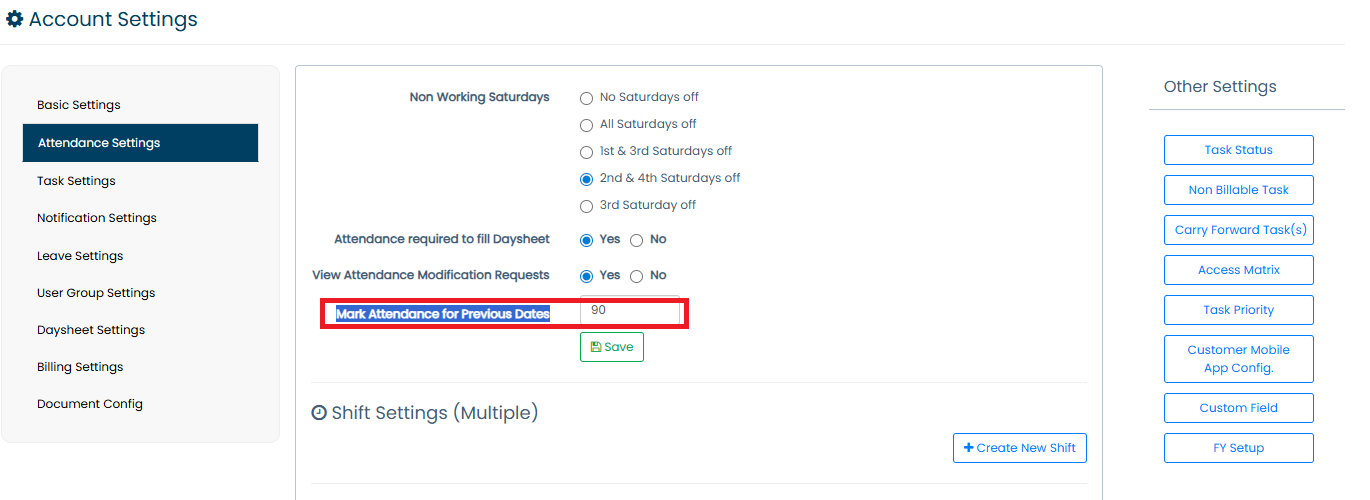
Locate the option “Mark Attendance for Previous Dates”.
Enter the number of previous days for which attendance marking should be allowed.
Click Save.
After Enabling:
Admin and HR will be able to update or change the attendance of the respective user for the allowed previous dates.
Updated 09 Mar 2026 · View on support.erpca.com